

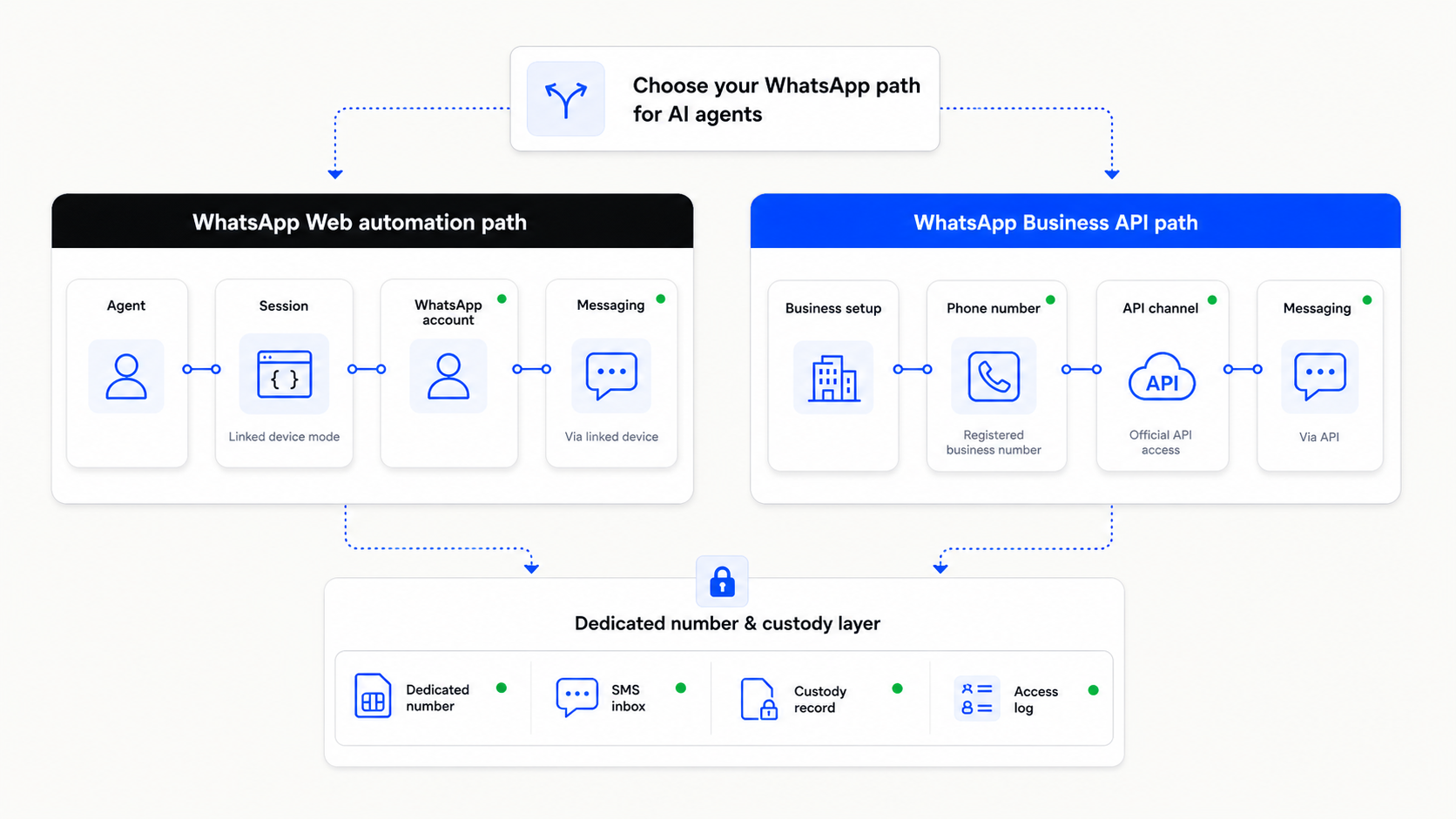
WhatsApp automation has two different paths
WhatsApp automation is not one deployment model. Most agent builders end up looking at two different paths: a WhatsApp Web or Baileys-style account workflow, or the official WhatsApp Business API.
The Web/Baileys path is closer to normal WhatsApp account behavior. The official API path is the supported business messaging route. Each path has different tradeoffs, number requirements, and risk profiles.
This article is for technical operators, AI automation agencies, WhatsApp consultants, and agent builders deciding which path to use and what number should sit behind it.
The two paths are not interchangeable
A Baileys or WhatsApp Web workflow depends on normal WhatsApp account behavior and a linked-device style session. Baileys describes itself as a WebSockets-based TypeScript library for interacting with the WhatsApp Web API, and its maintainers say it is not affiliated with or endorsed by WhatsApp.
The official WhatsApp Business API is different. It is Meta’s supported business platform path for production business messaging, templates, CRM or helpdesk integration, and policy-governed customer communication.
The practical mistake is treating these as two versions of the same deployment. They are not. The Web/Baileys path is usually chosen for speed, account-like behavior, group-like workflows, or experiments. The official API path is usually chosen for production customer messaging and formal business operations.
The phone-number problem appears in both paths
For a Web/Baileys workflow, the problem is personal-number risk. If the agent runs on a founder’s, employee’s, contractor’s, or client’s personal WhatsApp number, the workflow inherits that person’s identity, recovery risk, and continuity risk.
For the official API path, the problem is number readiness. Meta’s Cloud API documentation says that a phone number currently registered with WhatsApp Messenger or the WhatsApp Business App must first be deleted before it can be added to the Cloud API. It also says the operator needs access to the number to receive the verification code during setup.
That is why a dedicated unused number helps both paths. For Web/Baileys, it isolates the experiment or workflow from a personal identity. For the official API, it can reduce onboarding friction because the number is chosen for business use from the start.
Choose the number based on the deployment path
WhatsApp automation path decision table
| Path | Best for | Number issue | Textrovault role |
|---|---|---|---|
| Baileys / Web | Agent experiments, group-like behavior, fast setup | Personal-number risk | Dedicated agent number |
| WhatsApp API | Production customer messaging | Clean number onboarding | Fresh business number |
Baileys / Web
- Best for
- Agent experiments, group-like behavior, fast setup
- Number issue
- Personal-number risk
- Textrovault role
- Dedicated agent number
WhatsApp API
- Best for
- Production customer messaging
- Number issue
- Clean number onboarding
- Textrovault role
- Fresh business number
The table is not saying one path is always better. It is saying each path has a different operating shape. If you use the Web/Baileys path, do not attach it to a personal number unless the workflow is disposable. If you use the official API path, do not start onboarding with a number that is already tied to the wrong WhatsApp account.
The phone number should match the seriousness of the workflow. A quick private test may tolerate a personal number. A client workflow, production experiment, business API setup, or long-running agent should not depend on a number nobody can cleanly own, verify, recover, or hand off.
Where Textrovault fits
Textrovault is built for the phone-number layer. For the Web/Baileys path, Textrovault can provide a dedicated SIM-based number for the agent, experiment, client, or environment, with SMS receive, dashboard access, API/webhooks, access controls, and logs. The goal is risk isolation and custody, not ban-proofing.
For the official WhatsApp Business API path, Textrovault can provide a fresh business number intended for onboarding and long-term custody. The goal is number readiness: the operator has a number chosen for the business workflow, with access to receive verification messages and a record of which client, brand, workflow, or environment it belongs to.
Textrovault is for authorized workflows only: accounts, systems, clients, brands, and processes the operator owns, manages, or is explicitly allowed to operate. It is not for spam, impersonation, unauthorized messaging, account farming, ban evasion, or bypassing platform rules.
If you are deciding between WhatsApp Web automation and the official WhatsApp Business API, start with the phone-number question. Which number will the workflow use? Who owns it? Who can receive verification messages later? What happens if the workflow moves from experiment to production?
If the workflow should not run on a personal number, apply for early access to Textrovault.