

The API is not always the first problem
WhatsApp Business API onboarding often slows down before the API work begins. The client may want automation, templates, CRM integration, shared inbox routing, or a customer support workflow, but the phone number is not ready.
The number may already be active on WhatsApp Messenger or the WhatsApp Business App. It may belong to a founder, employee, contractor, or old agency. The business may not know who can receive verification messages. The number may be hard to recover, hand off, or document.
This article is for WhatsApp Business API consultants, BSP-adjacent implementers, shared-inbox onboarding teams, CRM and helpdesk integrators, automation agencies, and technical operators who see number friction before the technical build starts.
The wrong number creates onboarding friction
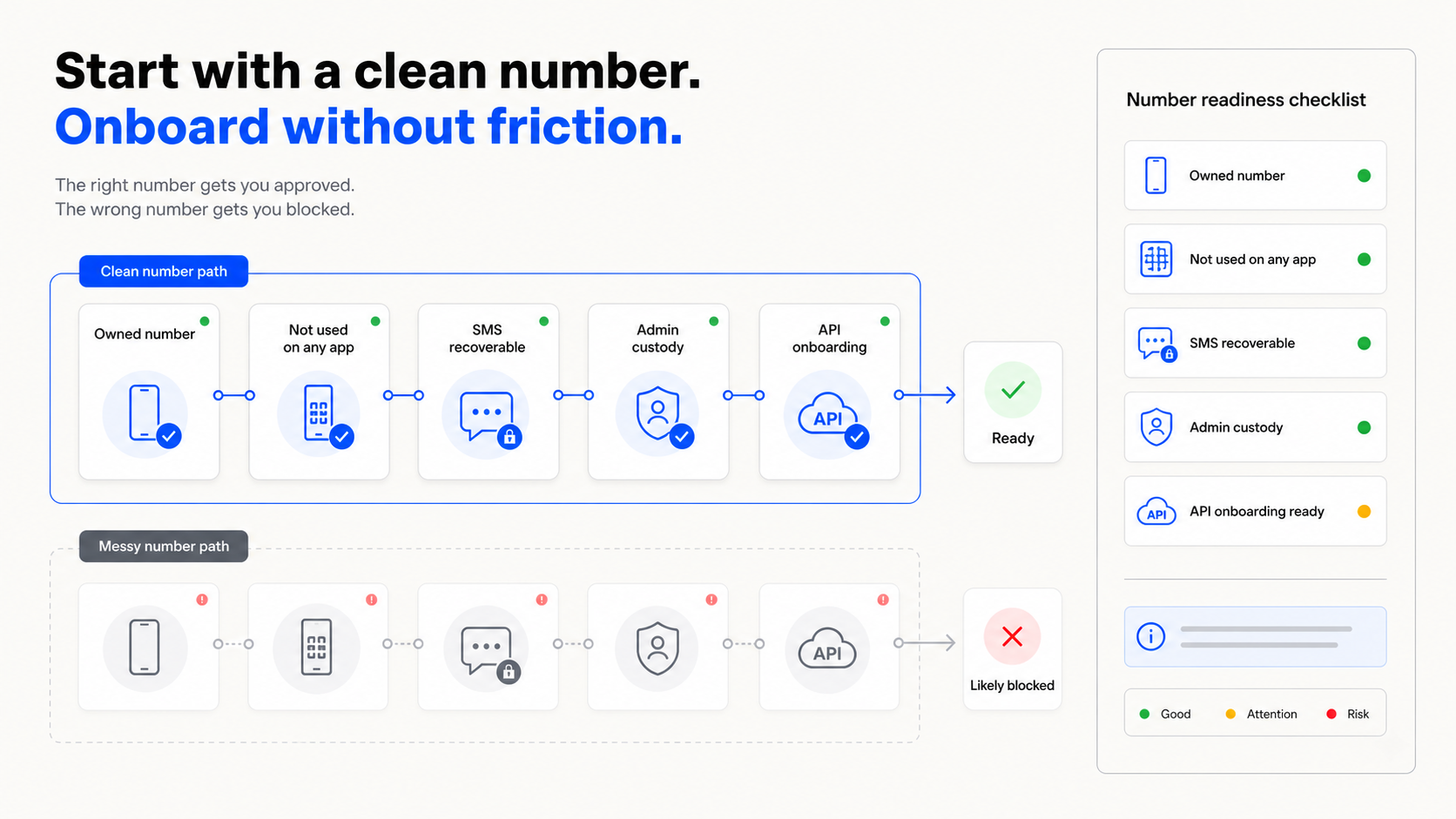
A WhatsApp Business API project needs a phone number that can be registered, verified, owned, and recovered. If the number is already tied to the wrong app account, or if nobody can reliably receive verification messages, the implementation can stall before the first useful workflow is built.
Meta’s Cloud API phone-number setup documentation says the operator needs access to the phone number to receive a verification code. It also explains that a phone number already registered with WhatsApp Messenger or the WhatsApp Business App may need to be deleted or moved before it can be used with the Cloud API path.
That means number readiness is not admin trivia. It is part of the deployment. If the number is not ready, the API implementation is not ready.
The common number failure modes
The founder-number problem is common. A company starts WhatsApp on the founder’s phone because it is available. Later, the company wants to connect the number to an API, CRM, shared inbox, or support workflow. The number is now both personal infrastructure and business infrastructure.
The employee-number problem is similar. A salesperson, support person, or operations person used their own number because they were close to the customer workflow. When they leave, change roles, lose the SIM, or stop managing the account, recovery becomes unclear.
The unmanaged-client-number problem appears in agency work. The client technically owns the number, but nobody has documented who can receive verification messages, who approves changes, who controls recovery, or what happens after handoff.
These are not API problems. They are custody problems. The number is part of the system, but it was never treated like system infrastructure.
The number-readiness checklist
WhatsApp API number-readiness checklist
- The number is not currently registered in WhatsApp Messenger or WhatsApp Business App.
- The business owns or controls the number.
- The setup operator can receive the verification code.
- Recovery access will still exist after onboarding.
- Admin ownership is documented.
- The number is not tied to a founder or employee phone.
- Handoff and re-verification instructions are written down.
This checklist should be completed before implementation work starts. If the number is not ready, the project may be blocked by ownership and verification issues instead of API issues.
A fresh dedicated number is often simpler for new workflows. It gives the project a clean starting point: one number for one business workflow, client, brand, or environment. Existing customer-facing numbers can still be important, but they should be migrated deliberately, not casually reused.
Where Textrovault fits
Textrovault is built for the phone-number layer. For a new WhatsApp Business API workflow, Textrovault can provide a dedicated SIM-based number assigned to a client, brand, workflow, or environment. The number can receive SMS through Textrovault, be visible in a dashboard, connect to API or webhooks where needed, and stay documented as part of the workflow.
This helps agencies and consultants avoid tying the implementation to a founder’s phone, an employee’s phone, or a number nobody can recover later. The value is not just getting a number. The value is number readiness, custody, verification access, and a record of what the number belongs to.
Textrovault does not replace Meta onboarding, a BSP, CRM integration, templates, or policy compliance. It supports the number layer: dedicated SIM-based number supply, SMS receive, assignment, access controls, and logs.
Textrovault is for authorized workflows only: businesses, clients, brands, systems, and processes the operator owns, manages, or is explicitly allowed to operate. It is not for spam, impersonation, unauthorized messaging, account farming, ban evasion, or bypassing platform rules.
If your WhatsApp Business API project is blocked by number readiness, apply for early access to Textrovault.