

OpenClaw WhatsApp Agents Should Use Dedicated Phone Numbers
OpenClaw WhatsApp agents should not usually run on a personal WhatsApp number. OpenClaw's WhatsApp channel uses a WhatsApp Web/Baileys-style linked-device path, so the attached number becomes part of the agent's operating infrastructure. If that number belongs to a founder, employee, contractor, or client without clear custody, the workflow inherits that person's identity, availability, and recovery risk.
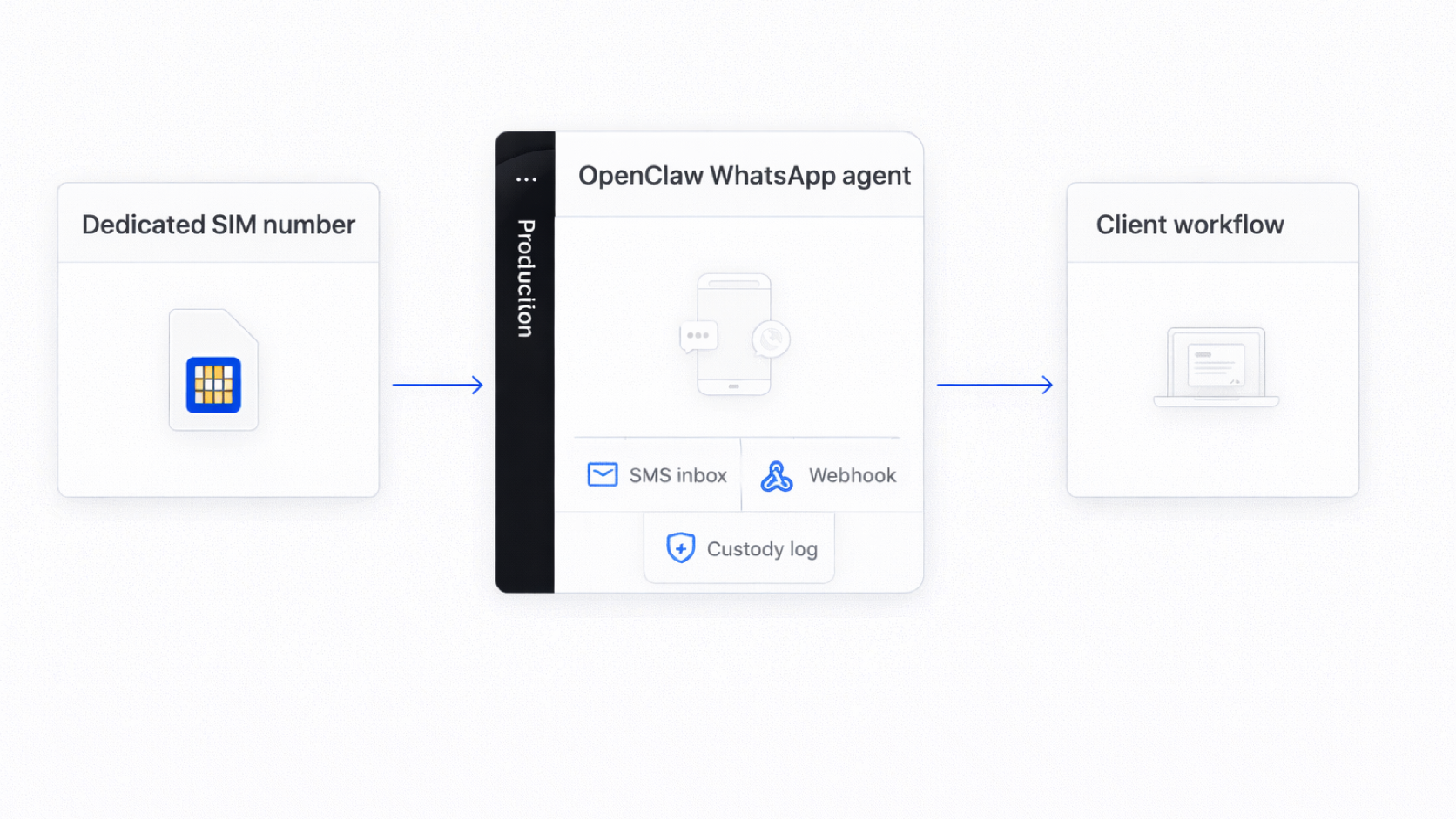
OpenClaw's own WhatsApp documentation says the channel is production-ready via WhatsApp Web (Baileys) and that the gateway owns linked sessions. It also recommends running WhatsApp on a separate number when possible, calling the dedicated-number setup the cleanest operational mode because it creates a separate WhatsApp identity, clearer routing boundaries, and less self-chat confusion.
That is the point of this article: if you are serious enough to run WhatsApp as an agent channel, you should be serious enough to give that channel its own number.
OpenClaw WhatsApp is not the same as the official WhatsApp Business API
OpenClaw's WhatsApp channel is built around WhatsApp Web/Baileys behavior. Baileys describes itself as a WebSockets-based TypeScript library for interacting with the WhatsApp Web API. Its maintainers also state that Baileys is not affiliated with, authorized by, or endorsed by WhatsApp, and they discourage spam, stalkerware, bulk, or automated messaging usage that violates WhatsApp's terms.
That does not mean OpenClaw is useless or unserious. It means the operator needs to understand what kind of channel they are using. This is not the same as building on the official WhatsApp Business Platform or Cloud API. The attached WhatsApp account and phone number remain operationally important because the agent is connected through a linked-device path.
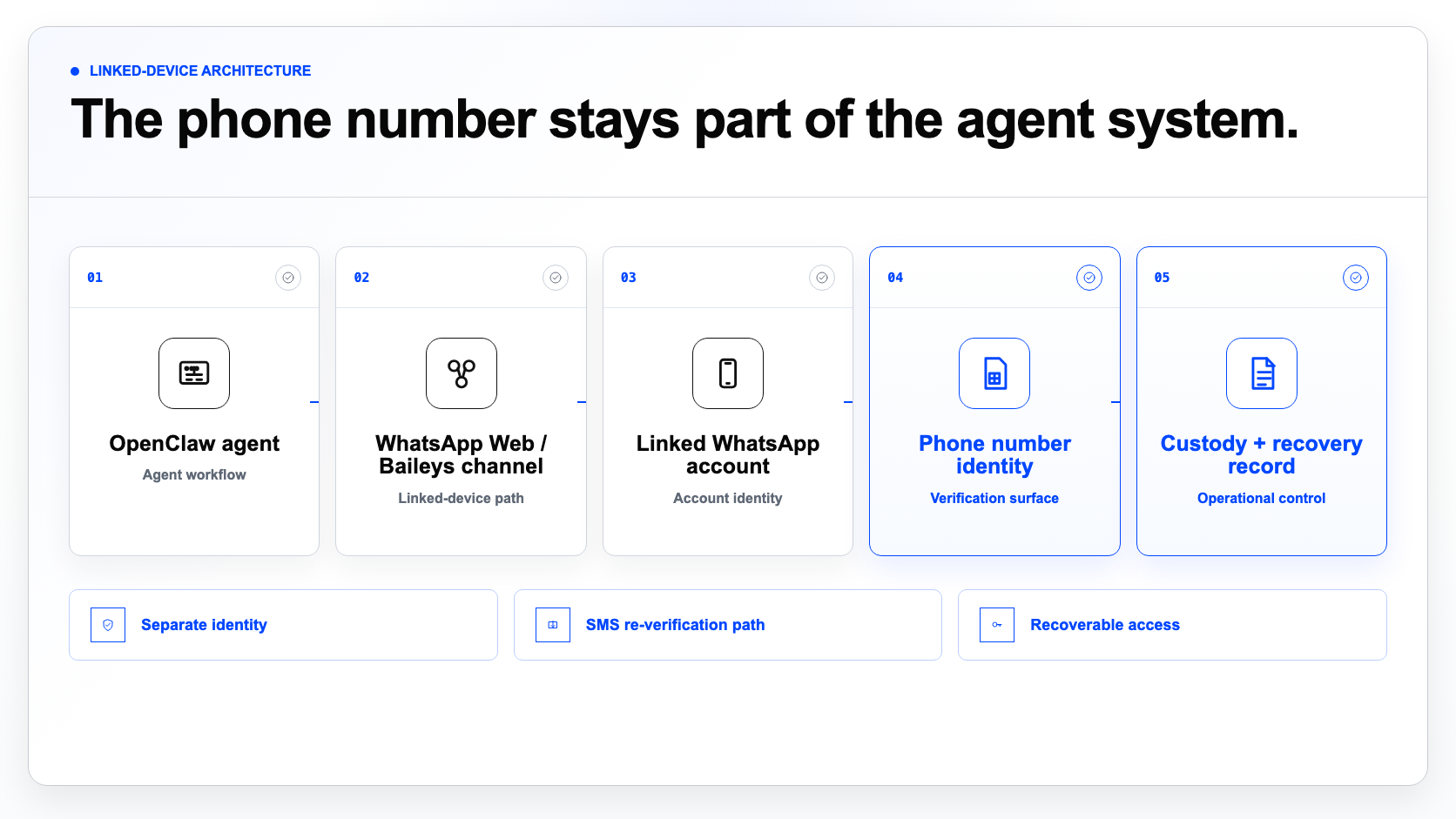
This makes the phone number more than a contact detail. It becomes the WhatsApp identity behind the agent.
The number becomes production infrastructure
When an OpenClaw WhatsApp agent uses a number, that number does several jobs. It identifies the WhatsApp account. It receives initial verification or later re-verification messages. It may become the number customers, users, groups, or workflows recognize. It may be used in allowlists, routing rules, approval flows, and handoff documentation.
If the number is personal, the agent is tied to a person. If the number is employee-owned, the workflow can break when the employee leaves. If the number is client-owned but the agency has no clear custody process, recovery becomes unclear. If one number is reused across experiments, clients, and production workflows, the blast radius gets larger than it needs to be.
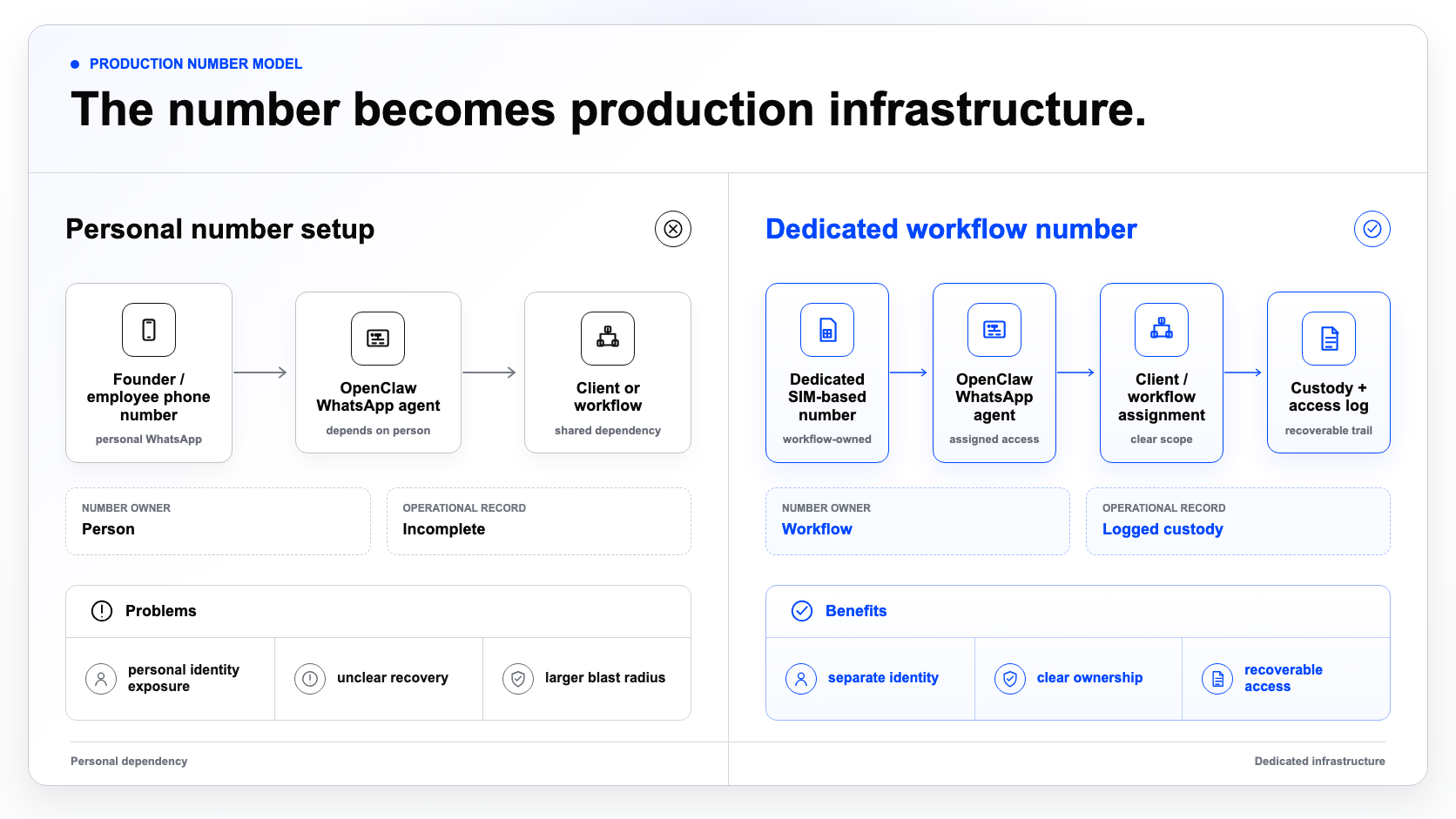
The practical question is simple: who owns the number after the agent is running?
If the answer is "the founder's phone," "the developer's spare SIM," or "the client's personal WhatsApp," the setup is weak.
Dedicated numbers reduce blast radius
A dedicated number does not make a WhatsApp workflow risk-free. It does not make unofficial automation official. It does not make policy violations safe. WhatsApp's Business Messaging Policy says WhatsApp may limit or remove access for policy violations, low-quality experiences, harm, or unauthorized scale messaging.
A dedicated number does something narrower and more practical: it isolates the workflow.
If an experiment fails, the operator's personal number is not the asset at risk. If a client project ends, the number can be handed over, retired, or reassigned according to the agreement. If staging and production behave differently, they do not need to share one WhatsApp identity. If a workflow needs re-verification later, the SMS path is not trapped on someone's old phone.
This is why "avoid bans" is the wrong language. The better language is "reduce blast radius" and "clarify custody."
Use one number per agent, client, or environment when the workflow matters
A single number may be fine for a quick prototype. It is usually not the right pattern for serious work.
For OpenClaw WhatsApp workflows, a better default is to assign numbers based on operational ownership: one number per agent when the agent has its own persistent WhatsApp identity; one number per client when an agency is building separate client workflows; one number per environment when dev, staging, and production need to be isolated; one number per brand when a business operates multiple brands or storefronts; and one number per recovery domain when long-term verification and custody matter.
Use a dedicated number when ownership changes
Per agent
Persistent WhatsApp identity
Per client
Separate agency deployments
Per environment
Dev, staging, production
Per brand
Separate business identities
Per recovery domain
Long-term verification custody
The exact unit depends on the workflow. The principle is stable: do not attach important agent infrastructure to a personal number unless you are comfortable with the identity, recovery, and handoff risks.
The available number setups have different tradeoffs
There are several ways to attach a phone number to an OpenClaw WhatsApp workflow. A personal number is fastest, but it ties the agent to a person. A client number may be necessary, but custody and recovery must be explicit. A spare SIM gives some separation, but it creates device, storage, and handoff problems. A virtual or VoIP number may work for some messaging or SMS workflows, but it is not always suitable where a mobile/SIM-based number matters. A dedicated SIM-based Textrovault number is the right fit when the operator needs separation, SMS receiving, custody, and a managed record of which number belongs to which agent, client, or environment.
Number setup tradeoffs
| Compare by | Personal number | Client number | Spare SIM | Virtual / VoIP | Dedicated SIM-based number |
|---|---|---|---|---|---|
| 1Speed to start | Fastest | Quick | Medium | Quick | Planned |
| 2Identity separation | Low | Medium | Medium | Good | High |
| 3Recovery custody | Personal | Client-held | Device-held | Service-held | Workflow-held |
| 4Operational clarity | Unclear | Conditional | Partial | Medium | High |
| 5Best fit | Supervised tests | Client-owned work | Temporary setups | Generic workflows | Agent/client/env workflows |
Personal number
- Speed to start
- Fastest
- Identity separation
- Low
- Recovery custody
- Personal
- Operational clarity
- Unclear
- Best fit
- Supervised tests
Client number
- Speed to start
- Quick
- Identity separation
- Medium
- Recovery custody
- Client-held
- Operational clarity
- Conditional
- Best fit
- Client-owned work
Spare SIM
- Speed to start
- Medium
- Identity separation
- Medium
- Recovery custody
- Device-held
- Operational clarity
- Partial
- Best fit
- Temporary setups
Virtual / VoIP
- Speed to start
- Quick
- Identity separation
- Good
- Recovery custody
- Service-held
- Operational clarity
- Medium
- Best fit
- Generic workflows
Dedicated SIM-based number
- Speed to start
- Planned
- Identity separation
- High
- Recovery custody
- Workflow-held
- Operational clarity
- High
- Best fit
- Agent/client/env workflows
The goal is not to pretend every workflow needs the same setup. The goal is to avoid using a personal number by default when the workflow is important enough to run as infrastructure.
Official WhatsApp API onboarding has its own number constraints
There is another reason number planning matters. Official WhatsApp Business Platform setup also depends on phone-number readiness. Meta's Cloud API documentation says that if a phone number is currently registered with WhatsApp Messenger or the WhatsApp Business App, it must first be deleted before it can be added. It also says the operator needs access to the phone number to receive the verification code during setup.
This matters even if an operator starts with OpenClaw. A project may later move toward an official WhatsApp Business API setup, a BSP, a CRM integration, or a more formal client handoff. If the number was casually chosen at the beginning, that later migration can become painful.
A clean number strategy gives the operator more options.
What Textrovault provides
Textrovault is built for this phone-number layer.
For an OpenClaw WhatsApp agent, Textrovault can provide a dedicated SIM-based number that is assigned to a specific agent, client, workflow, or environment. The number is not a public inbox. It is not a founder's personal phone. It is not an unmanaged spare SIM sitting in a drawer. It is a managed phone identity with dashboard access, SMS receiving, custody records, and software access paths.
The basic architecture is: OpenClaw agent -> WhatsApp/Baileys channel -> dedicated Textrovault number -> SMS verification/re-verification inbox -> custody and access log.
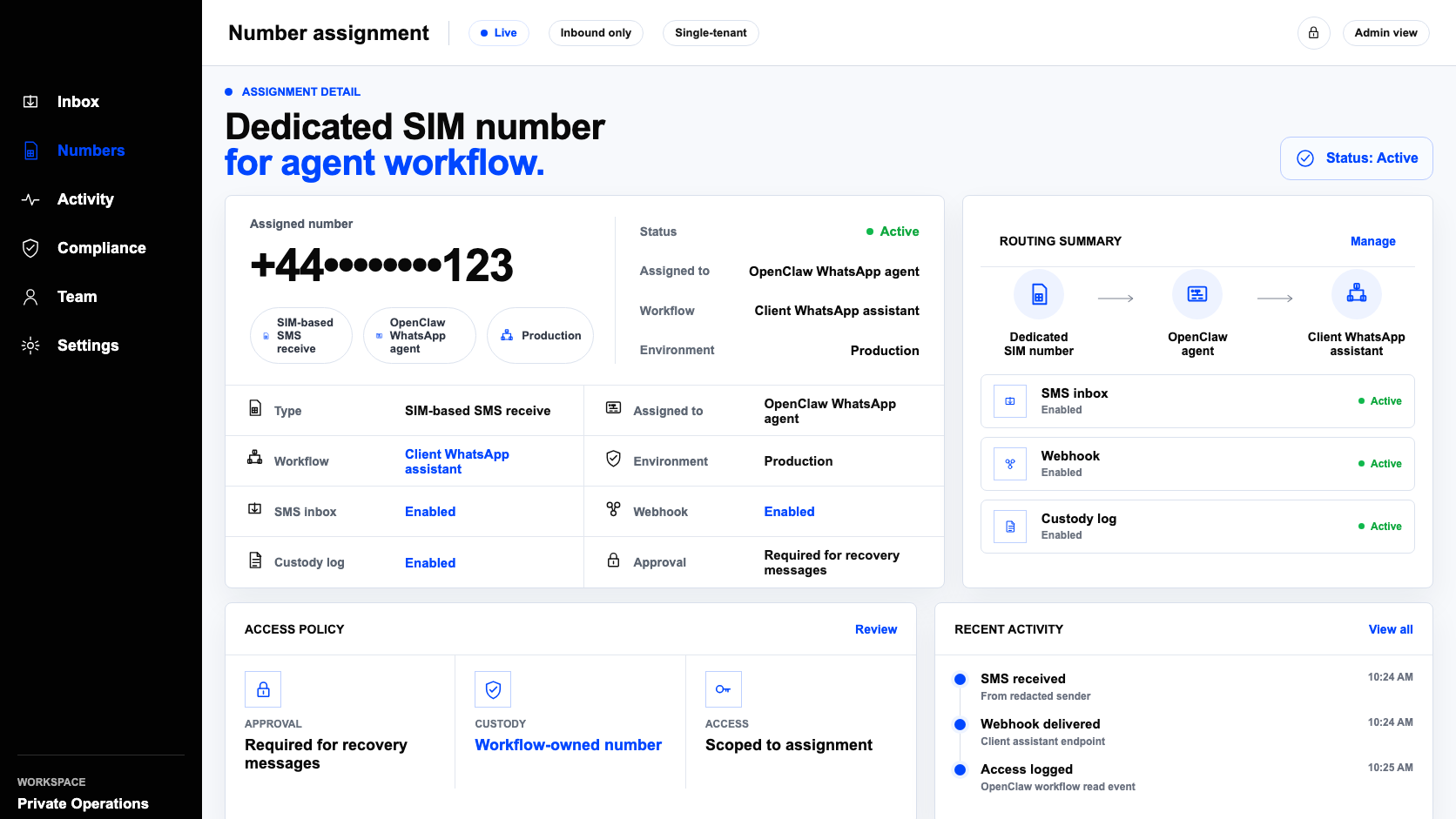
The goal is not to make WhatsApp automation risk-free. The goal is to stop making a human's personal number the hidden foundation of the workflow.
What to check before using a number
Before attaching a number to an OpenClaw WhatsApp agent, answer these questions: Who owns this number? Is it personal, client-owned, agency-owned, or workflow-owned? Who can receive SMS verification or re-verification messages? Is the number being used for testing, production, or both? What happens if the operator leaves? What happens if the client wants the number after handoff? What happens if the workflow needs verification again six months later? Can access be revoked or reassigned?
Before you attach a number
- Who owns this number?
- Is it personal, client-owned, agency-owned, or workflow-owned?
- Who can receive SMS verification or re-verification messages?
- Is it used for testing, production, or both?
- What happens if the operator leaves?
- What happens if the client wants the number after handoff?
- What happens if the workflow needs verification again six months later?
- Can access be revoked or reassigned?
If these answers are unclear, the number is not ready to become infrastructure.
The practical rule
If you are using OpenClaw WhatsApp casually, a personal number may be enough to test. If you are using OpenClaw WhatsApp for a serious agent, client workflow, production experiment, agency deployment, or long-term account-facing system, the number should not be personal.
Treat the WhatsApp number like infrastructure. Give it a clear owner. Assign it to the workflow. Keep recovery access available. Separate clients and environments. Log custody and access. Use a dedicated SIM-based number when the workflow needs a real mobile-number identity.
Apply for an OpenClaw WhatsApp agent number
If you are building an authorized OpenClaw WhatsApp workflow that should not run on a founder's, employee's, contractor's, or client's personal number, apply for early access to Textrovault.
Apply for an OpenClaw WhatsApp agent number
For authorized OpenClaw WhatsApp workflows that should not run on a founder's, employee's, contractor's, or client's personal number.
Apply for Early AccessTextrovault is currently focused on technical operators who need dedicated SIM-based numbers for legitimate agent, client, workflow, and test-environment use cases.